

Highlights
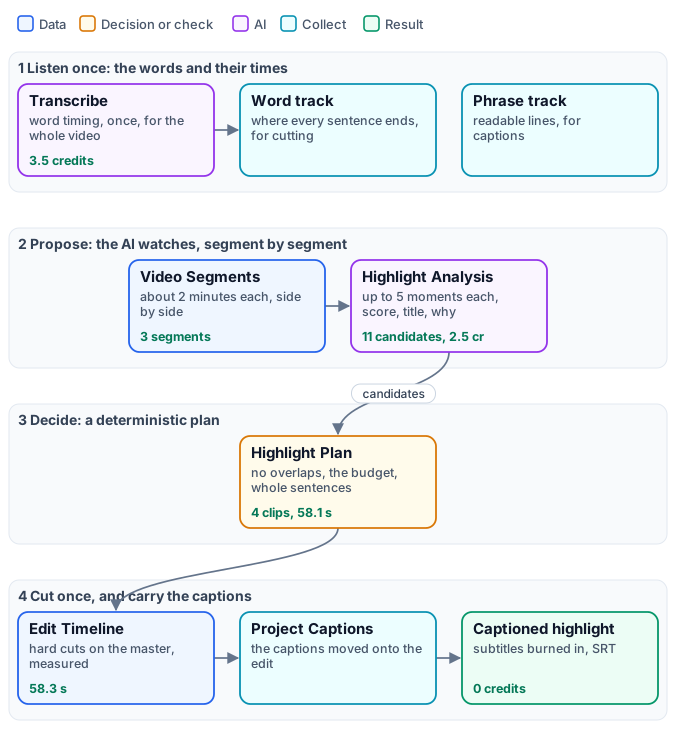
A six-minute interview holds a minute worth sharing — somewhere. Finding it by hand means watching the whole thing, choosing, cutting at the right word and captioning again. Madoo splits that job the way an editor would: an AI proposes moments, code decides which ones fit, one cut makes the video, and the captions follow the cut. The AI never touches the timeline: it suggests, and a deterministic plan — the same result every time for the same proposals — chooses, cleans and places the cuts.
1. Listen once: the words and their times
Section titled “1. Listen once: the words and their times”A good highlight never starts or ends in the middle of a sentence, so the plan needs to know where sentences end. Speech to Text transcribes the whole soundtrack once, with word timing (see Transcription and captions), and Aggregate Transcript turns it into two tracks from the same transcript:
- a word track (
speech_readyoff): every word with its time — where each sentence ends, where the speaker changes, where there is a pause. The plan cuts on it. - a phrase track (
speech_readyon): readable lines. The captions of the highlight come from it.
The transcription is optional: without it the plan cuts where the AI said, and the highlight has no captions — the transcription’s credits are saved, at the price of cuts that may fall mid-sentence.
2. Propose: the AI watches, segment by segment
Section titled “2. Propose: the AI watches, segment by segment”Video Segments (enumerate/video_segments) cuts the video into parts of about two minutes (target 120 s, at most
180 s, 1–2 seconds of overlap) — see Long media — and
Highlight Analysis (ai/video_highlight_analysis) watches each part with a video model and proposes moments.
Connect the segment and its segment_id, index, start and end to the analysis, so it knows where the
part sits in the whole video.
| Setting | Default | Meaning |
|---|---|---|
Editorial Focus (editorial_focus, an input) |
self-contained, useful, surprising or engaging moments | what to look for, in your words: “what a customer would share”, “every demonstration of the product” |
Maximum Candidates (maximum_candidates) |
5 (1–20) | moments proposed per segment |
| Minimum / Maximum Candidate Seconds | 6 / 30 (up to 180) | the length of a moment |
Failure Policy (failure_policy) |
best_effort |
what a failed or unreadable answer does, see below |
Max Tokens (max_tokens) |
8192 (256–8192) | the model’s budget per segment, reasoning included |
Each moment comes back as a candidate (madoo.video-highlight-candidates/v1): its start and end, a score from 0
to 1, a title, a reason, a topic, a kind (hook, insight, emotion, result…) and whether it stands on its
own. The answer is checked before anything uses it: times written as 01:05 are read, times given on the whole video
instead of the segment are converted (absolute_provider_timestamps_normalized), moments outside the segment or
malformed are dropped (invalid_provider_candidate), too short ones are dropped (candidate_too_short) and too long
ones shortened (candidate_clamped). Every such correction is a warning in the candidates document.
When the model fails. With best_effort, a segment whose answer fails — the provider refuses, the answer is empty
or not valid JSON — gives no candidates and a warning with the reason, and the other segments go on; with strict the
step fails. Give the model room to answer: the default video model reasons before it writes, and its reasoning
counts against Max Tokens. With a budget of 2048 the reasoning used almost all of it and the answer arrived cut
short — HIGHLIGHT_RESPONSE_INVALID_JSON on every segment, and no highlight. Keep the default of 8192; lower it only
with a model that does not reason.
3. Decide: a deterministic plan
Section titled “3. Decide: a deterministic plan”Highlight Plan (aggregate/video_highlight_plan) collects the candidates of all segments and chooses the moments,
with no AI and no credits. Connect the candidates, the video’s measured source duration (from Media Technical
Info), the target duration — a number input, so each run can ask for its own length — and the word track.
| Setting | Default | Meaning |
|---|---|---|
Target Duration (target_duration) |
60 s | the budget: the plan never exceeds it |
| Minimum / Maximum Clip Seconds | 6 / 30 | the length of a clip |
Maximum Clips (maximum_clips) |
12 (1–20) | the most clips in the highlight |
Boundary Snap (boundary_snap_seconds) |
1.5 (0–5) | how far a cut may move to land on a sentence |
How it chooses, in order:
- Clean. Each candidate is kept inside the video, snapped to the word track (below), and dropped if shorter than the minimum.
- No overlaps. Two candidates that overlap keep only the stronger (
overlapping_candidate_removed). - Rank. Moments that stand on their own first, then the higher score, then the longer, then the earlier.
- Fill the budget in that order, up to Maximum Clips, with at most two clips per topic at first so that one subject does not take the whole highlight. A clip that does not fit the remaining time is skipped.
- Order by time. The chosen clips play in the order they happen.
Snapping to sentences. With a word track, a clip starts after the end of a sentence, a change of speaker or a pause of at least 0.75 s, and ends at the end of a sentence — or, failing that, a change of speaker or a clean pause, never the pause after a comma. If the proposed end falls mid-sentence, the plan moves back up to 8 seconds to the last complete sentence. After a sentence it keeps 0.4 s of the room’s natural sound, stopping 0.1 s before the next word, so the cut does not clip the last syllable. A clip may run past the maximum by up to the snap distance to end on a sentence.
The plan (madoo.video-highlight-plan/v1) lists each clip with its source times, score, title and reason, and its
warnings — target_duration_not_filled when the best valid choice is more than half a second short of the target.
The same candidates always give the same plan, with the same plan ID.
4. Cut once, and carry the captions
Section titled “4. Cut once, and carry the captions”Edit Timeline (video/edit_timeline) takes the whole master and the plan, and cuts: each clip is taken from the
master, re-encoded (H.264, AAC), and the clips are joined with hard cuts — no transitions, by design, so that the
captions stay frame-exact. It measures each clip and writes an edit manifest (madoo.video-edit-manifest/v1):
where every clip came from in the source and where it sits in the highlight, as measured. It accepts 1 to 20 clips,
in time order, not overlapping, from a master of up to 2 GiB.
Project Captions to Edit (utility/caption_timeline_project) moves the phrase track onto the highlight using the
manifest: a caption inside a clip is shifted to the clip’s place in the highlight, one that crosses a cut is
shortened to the clip (caption_cues_trimmed_at_edit_boundaries), one outside every clip is dropped. Video
Subtitles then burns them in; hide the speaker labels (speaker_labels hide) for a highlight shown to an
audience. The SRT of the burned captions is its captions output.
Shaping the result
Section titled “Shaping the result”| You want | Change |
|---|---|
| other moments | the Editorial Focus: say what matters to your audience |
| more, shorter moments | a lower Maximum Candidate Seconds and Maximum Clip Seconds — the lab’s first run with 30 s clips chose two long moments of one speaker; with 20 s it chose four, from two speakers |
| another length | the Target Duration input |
| a vertical version | Resize the highlight to 9:16 afterwards — see Editing video |
| no captions | no transcription: cuts where the AI said, no transcription credits |
The paid steps are the transcription and the analysis; the plan, the cut and the captions cost nothing and take seconds.
What it costs
Section titled “What it costs”- Speech to Text: 0.5 credits per minute of video (ElevenLabs Scribe V2), rounded to the started minute.
- Highlight Analysis: priced on the tokens the video model reads and writes — about 0.8 credits per two-minute segment in the lab, with Gemini 3.8 Flash (the default).
- Everything else: no credits.
The lab’s six minutes cost 6.0 credits: 3.5 for the transcription, 2.5 for three segments of analysis.
Lab: a six-minute briefing in under a minute
Section titled “Lab: a six-minute briefing in under a minute”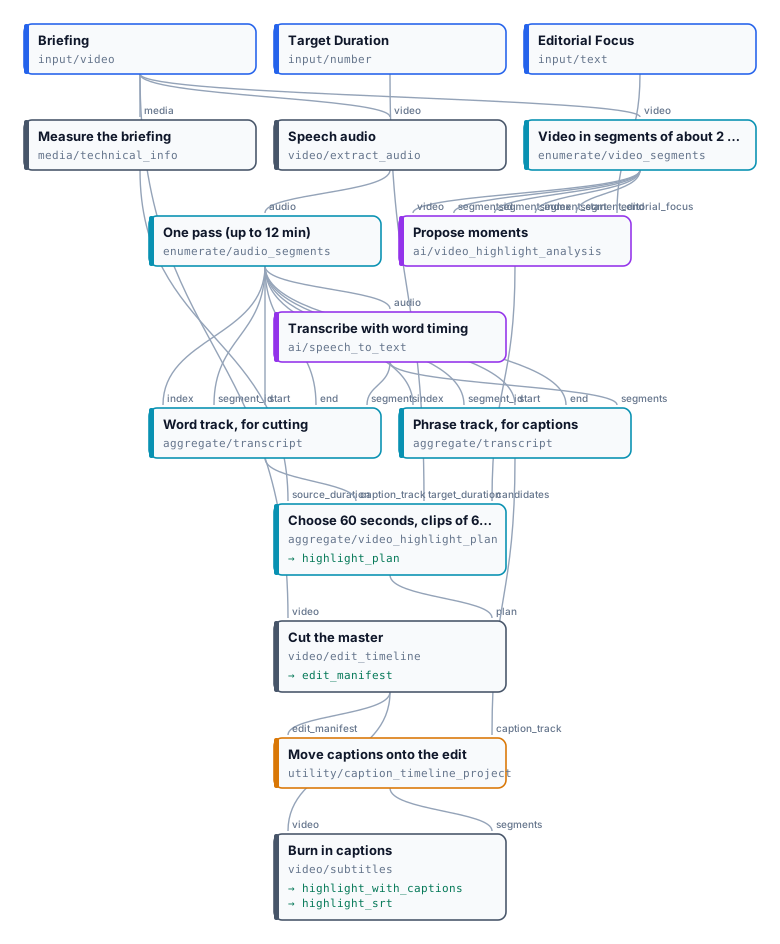
The briefing of the dubbing example — the NASA Administrator and three astronauts, six minutes — with the focus “self-contained moments a general audience would share: why the Moon, what the astronauts feel, what Artemis will make possible”, a target of 60 seconds and clips of 6 to 20 seconds. The analysis proposed eleven moments across the three segments; the plan chose four:
| Source | Length | Score | Moment (the AI’s title) |
|---|---|---|---|
| 0:24 – 0:40 | 15.9 s | 0.95 | Artemis: Sending Women to the Moon |
| 2:29 – 2:44 | 14.7 s | 0.92 | The Moon Is the Proving Ground for Mars |
| 3:58 – 4:06 | 8.1 s | 0.82 | Sustained on the Moon, Headed to Mars |
| 4:11 – 4:31 | 19.4 s | 0.88 | Why Space Investment Returns Huge Dividends |
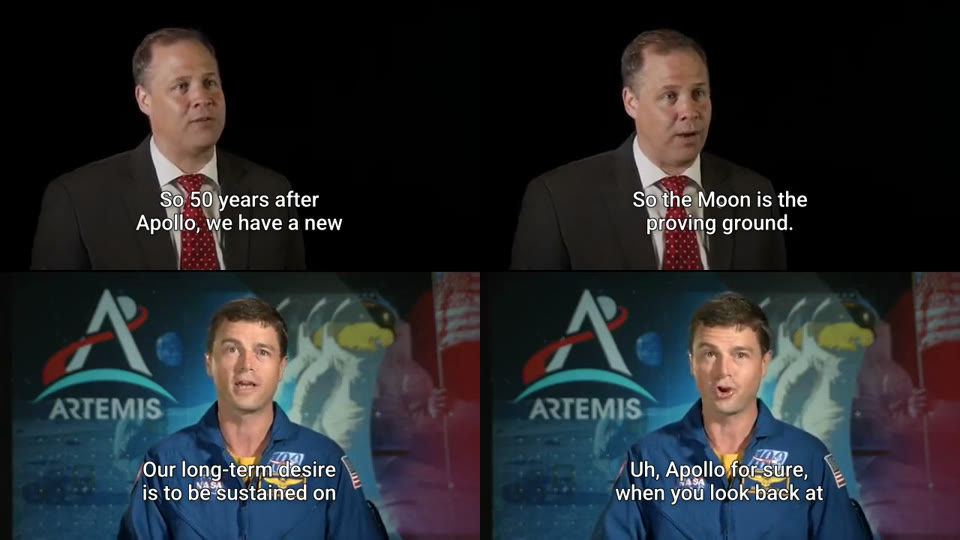
58.1 seconds planned, 58.3 measured; the plan warns target_duration_not_filled — no fifth moment fitted the 1.9
seconds left. Every clip starts and ends on a complete sentence. 6.0 credits. The
plan lists each moment with the AI’s reason; the captions
are result-highlight.srt.
node madoo-install-example.mjs lab-highlights --api <your Madoo API URL> --key <key.json> --run --save highlightMedia: “Artemis Media Resource — Interview Soundbites”, NASA (public domain; NASA does not endorse this documentation). The title card with press contacts at the start of the original is not part of the example.
When a step fails
Section titled “When a step fails”| Code | Meaning | Fix |
|---|---|---|
HIGHLIGHT_NO_VALID_CANDIDATES (plan) |
no segment proposed a usable moment | read the candidates’ warnings: often the model’s answer was cut short — keep Max Tokens at 8192 |
HIGHLIGHT_RESPONSE_INVALID_JSON, HIGHLIGHT_EMPTY_RESULT (warnings, best_effort) |
a segment’s answer was unreadable or empty | raise Max Tokens; run again |
HIGHLIGHT_SEGMENT_METADATA_MISSING |
the analysis does not know where the segment sits | connect segment_id, index, start and end from Video Segments |
HIGHLIGHT_BUDGET_UNSATISFIABLE |
no clip fits the target | raise the target, or lower the minimum clip length |
VIDEO_EDIT_ORDER_INVALID, VIDEO_EDIT_RANGE_OVERLAP |
a plan edited by hand is out of order or overlapping | let the plan node produce the plan |
HIGHLIGHT_CAPTIONS_EMPTY |
no caption falls inside the chosen clips | the moments have no speech, or the transcription is missing |
MEDIA_TOO_LARGE, VIDEO_EDIT_SIZE_INVALID |
the master is over 2 GiB | compress it |