

D05 — A supplier's feed to a clean catalog
Trailhead Supply, an online outdoor-gear shop, lists the products of Alpenrand Outdoor, a German maker. Every day Alpenrand sends its product feed as a spreadsheet export — and every day a few rows are wrong: a category written in German, a price typed with a letter O instead of a zero, an article code left empty. This workflow publishes the good rows at once, and turns the bad ones into a list of corrections the supplier can act on, without anyone opening the file.
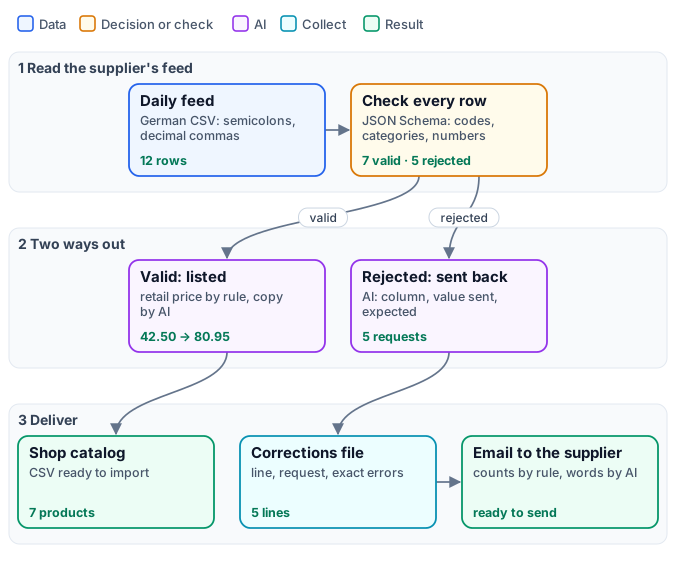
The reference run, on the feed of twelve products — 0.15 credits:
| Delivered | What is in it |
|---|---|
| Shop catalog | 7 products with SKU, title, category, retail price, stock, weight and a description |
| Corrections file | 5 rows to fix, by line in the supplier’s file, with the request and the exact check errors |
| Email to the supplier | below |
Subject: Corrections for tomorrow's product feed
Hello Alpenrand Outdoor,
Thank you for today's feed.
Rows received in today's feed: 12Rows listed in the shop: 7
Please fix these rows and include the corrected versions in tomorrow's feed:
Line 5 (AR-3111): category: sent "Zelt", expected one of backpacks, tents, sleeping-bags, apparel, cookwareLine 7 (AR-4206): price_eur: sent "12,5O", expected a numberLine 9 (no article code): sku: sent "", expected AR- followed by four digitsLine 10 (AR-5310): stock: sent "-3", expected at least 0Line 12 (AR-6121): price_eur: sent "", expected a number
Best,Trailhead Supply — Purchasing
And one listing of the catalog:
| SKU | Title | Price (EUR) | Description |
|---|---|---|---|
| AR-4205 | Firnlicht -5 sleeping bag | 263.95 | The Firnlicht -5 sleeping bag is designed for nights down to a comfort rating of -5°C. Its responsibly sourced 650-fill down keeps weight to 0.98 kg, and the included compression sack packs it down for transport. |
The case
Section titled “The case”The feed is a CSV exported from a German spreadsheet: semicolons between the columns and commas in the numbers.
sku;name;category;material;weight_kg;price_eur;stock;notesAR-2101;Gratkamm 38 daypack;backpacks;recycled nylon 210D;0,86;42,50;64;hip belt removable, hydration sleeveAR-3111;Hochmoor 1 tent;Zelt;silnylon, aluminium poles;1,48;129,00;8;solo version of Hochmoor 2AR-4206;Firnlicht +5 sleeping bag;sleeping-bags;responsibly sourced down 650 fill;0,71;12,5O;22;comfort +5 C, summer weightThe shop’s contract for a row is short: an article code AR- and four digits, a name, one of five categories, a
material, a weight between 0 and 25 kg, a wholesale price above zero and a whole, non-negative stock. The shop
sells at 1.9 times the wholesale price, rounded to a price ending in .95.
| Input | Who provides it | Example |
|---|---|---|
| Supplier feed | the supplier, every day | a CSV or Excel file uploaded as an asset |
What it shows
Section titled “What it shows”- Read the whole row, then check it. Data Input reads the CSV with
locale: de-DE, so42,50is the number 42.5 and12,5Ostays text. Data Rows could give each column its own typed port, but a single bad cell in a number column would then stop Data Rows itself (ROW_CONVERSION_FAILED): no row reaches the next steps, which are cancelled, and the run endspartial_successwith nothing produced. Here each iteration passes itsrow— all its values as one JSON object — to Validate JSON Schema, and only that row is judged. See Spreadsheets and Schemas. - The schema is the contract, written once. Codes, categories, numbers and limits are declared in the node’s
inline schema, in
routemode: a valid row continues onnormalized_json, a rejected one is cut from the listing branch, and itsvalidanderrorsoutputs drive the correction branch. - Rules for money, AI for words. The retail price is
round(wholesale * 1.9, 0) - 0.05— 42.50 becomes 80.95 — and never passes through a model. The description is written by AI from the checked record only, told to use the material, weight and notes it is given and to invent nothing. - Every problem goes back as something to do. For a rejected row, the AI reads the row as sent and the check’s
errors and writes each problem in one fixed form — the column, the value sent, what is expected — so the supplier
reads
price_eur: sent "12,5O", expected a numberinstead ofValue is "string" but should be "number". The exact errors stay next to it, in the corrections file, for anyone who wants them. - Counts by rule, the email by AI. The rows to fix are collected, counted by Calculate, and the rows listed
are the rows received minus those; the AI writes the email around these numbers and copies each request word for
word. The line numbers are the lines of the supplier’s own file (
row_index + 2: rows count from 0, after the header).
The workflow
Section titled “The workflow”The figure above tells the workflow as stages; the exact graph is the workflow (as a diagram), node by node in the table.
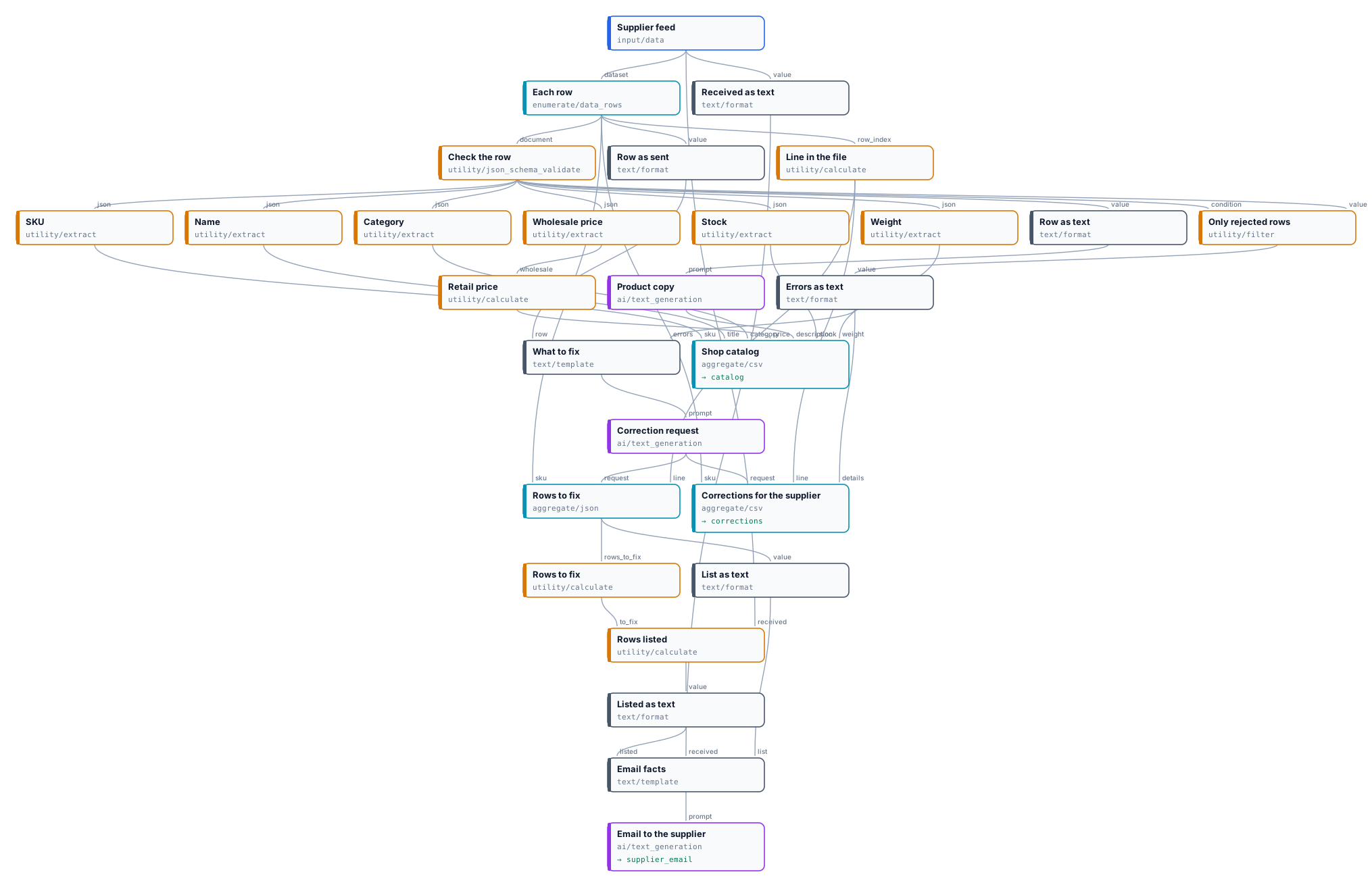
| Node | Type | Why |
|---|---|---|
| Supplier feed | input/data, locale: de-DE |
The day’s file; decimal commas read as numbers |
| Each row | enumerate/data_rows |
One iteration per product; row carries all its values, sku and row_index are kept for the corrections |
| Check the row | utility/json_schema_validate, inline schema, route |
The shop’s contract for a row |
| SKU, Name, Category, Wholesale price, Stock, Weight | utility/extract on normalized_json |
The checked values, typed; present only for a valid row |
| Retail price | utility/calculate |
round(wholesale * 1.9, 0) - 0.05 |
| Row as text / Product copy | text/format json, ai/text_generation with low reasoning effort |
The description, from the checked record |
| Shop catalog | aggregate/csv, whenAbsent: skip_row on SKU |
One line per listed product; rejected rows leave no line |
| Only rejected rows | utility/filter, invert: true on valid |
The errors of a rejected row, and nothing for a valid one |
| Row as sent / Errors as text / What to fix / Correction request | text/format json, text/template, ai/text_generation at temperature 0 |
One request per problem, in a fixed form |
| Line in the file | utility/calculate row_index + 2 |
The line the supplier sees in their spreadsheet |
| Corrections for the supplier | aggregate/csv, semicolons, whenAbsent: skip_row on the request |
One line per rejected row |
| Rows to fix / Rows listed | aggregate/json, utility/calculate count(…) and received - to_fix |
The numbers the email states |
| Email facts / Email to the supplier | text/format, text/template, ai/text_generation |
The email, around the numbers and the requests |
| Outputs | output/csv ×2, output/text |
The catalog, the corrections, the email |
Reading a run: the catalog and the corrections always add up to the feed — here 7 and 5 of 12. In the trace,
the listing steps of a rejected row and the correction steps of a valid row are skipped.
Cost: about a hundredth of a credit per AI text — a description per valid row, a request per rejected row, one email — so 0.15 credits for this feed of twelve. No description is written for a row that will not be listed.
Install it
Section titled “Install it”The example installs into your workspace with an API key, through the public API only — see Installing an example:
node madoo-install-example.mjs d05-supplier-feed --api <your Madoo API URL> --key <key.json> --run--run uploads the example feed and processes it (about 0.15 credits). To process your own, run the workflow with
your file on the input Supplier feed.
Change it
Section titled “Change it”- Your contract: the rules are the schema in Check the row — add a column, a pattern for EAN codes, a maximum price; a rejected row then explains the new rule on its own.
- Your pricing: the margin and the rounding are one expression in Retail price; a price per category is a Select by Key in front of it.
- Another supplier: set the locale of Supplier feed to the way the file writes numbers (
it-IT,fr-FR, or none for dots); an Excel file needs no change. - Images too: a text-to-image or product-photo step on the listing branch runs only for valid rows, like the description — see D01.
- Straight to the supplier: connect the email output to your mail system, or send the corrections file back through the supplier’s portal.