

I11 — A product placed in a scene, judged against the real one until it is faithful
A product placed in a new scene is re-drawn by the generator: the shape follows the new viewpoint, and so, sometimes, does the decoration. A portrait gets a different face, an ornament simplifies, a letter of the label changes. On a museum-shop page, on a catalogue, that is a different product.
This workflow places a sixteenth-century pharmacy jar on the counter of an old pharmacy, and lets Repeat Until Accepted keep it the same jar: in each picture Locate Subject finds the jar and crops it, Decide with a Model judges the crop against the museum photo, and, when it is not faithful, the picture is made again with a correction written by Image Analysis.
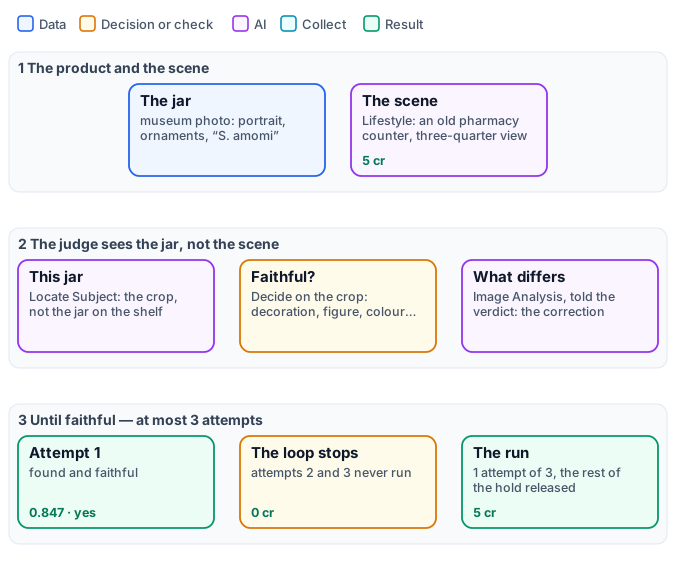
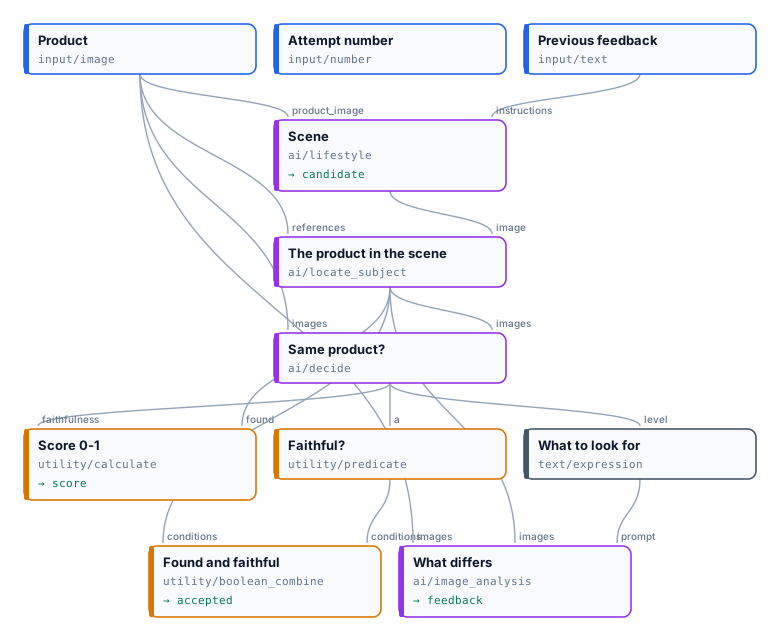
The exact graphs are the workflow and its body, one attempt (as a diagram).
The case
Section titled “The case”| Input | Who provides it | Reference run |
|---|---|---|
| A photo of the product | the shop | an albarello in tin-glazed maiolica, second half of the sixteenth century, The Metropolitan Museum of Art (object 188537, public domain) |
The brief: the jar stands on the marble counter of an old Italian pharmacy, among wooden drawers and glass bottles,
seen from a three-quarter angle slightly above, warm afternoon light — the Lifestyle node’s
custom_prompt.
The judge, and how it was made right
Section titled “The judge, and how it was made right”First, Locate Subject finds the jar in the generated picture, with the museum photo as its reference, and crops it with a 6 % margin. The scene has another jar on the shelf beside it; the crop holds this one, and nothing of the counter, the drawers or the light that a judge of the whole picture would weigh.
The judge is one score question of Decide with a Model, with four levels — different, similar, close, faithful — asked with the crop as Picture 1 and the museum photo as Picture 2:
How faithfully Picture 1 reproduces the product of Picture 2. Judge only what a change of viewpoint cannot explain: the decoration and its motifs, any portrait or figure, the colours of the glaze or print, and any lettering letter for letter. Ignore the background, the light, the framing, the perspective and the apparent proportions due to the camera angle.
The attempt is accepted only when the jar was found and at the level faithful — Combine Conditions (all) on
Locate Subject’s found and a Predicate equals faithful on the level Decide gives (faithfulness_level). Without
the first condition a picture that lost the jar would have no crop, and the judge would see the museum photo alone.
The score is the level as a number from 0 to 1, and 0 when nothing was found (if(found, faithfulness / 3, 0)). The
correction is Image
Analysis on the crop and the museum photo, with a prompt written by Text Expression that tells it the verdict: “A judge
rated how faithfully it reproduces the product as: close, so the product differs from Picture 2 somewhere. List, as
short instructions to the photographer, every difference…”.
It took six runs to get there, and each mistake is one a first body is likely to make:
| Body | What happened | The fix |
|---|---|---|
| a yes/no question “Picture 1 shows exactly the product of Picture 2” | accepted at once, 0.96, while the portrait had changed — the same model rated it close, with visible changes at 0.97 | accept on the strictest level of a score question, not on “is it the same?” |
| the score question judging shape and proportions | three attempts, the score stuck at 0.68: every correction asked for “a taller, slimmer vase” — what a view from above always shows shorter | judge and correct only what the viewpoint cannot explain |
| accepted when the expected score reached 2.5 of 3; Image Analysis asked for the differences on its own | over two runs, close four times out of five, while Image Analysis answered “none” four times: the next attempt was only a new draw | accept on the level faithful; tell the correction writer the verdict |
| the judge on the whole picture, with the fixes above | faithful at the first attempt, 0.82, but judged on the counter, the drawers and a second jar too | crop the jar with Locate Subject and judge the crop |
| the body above | found and faithful at the first attempt, 0.847 | — |
The reference run
Section titled “The reference run”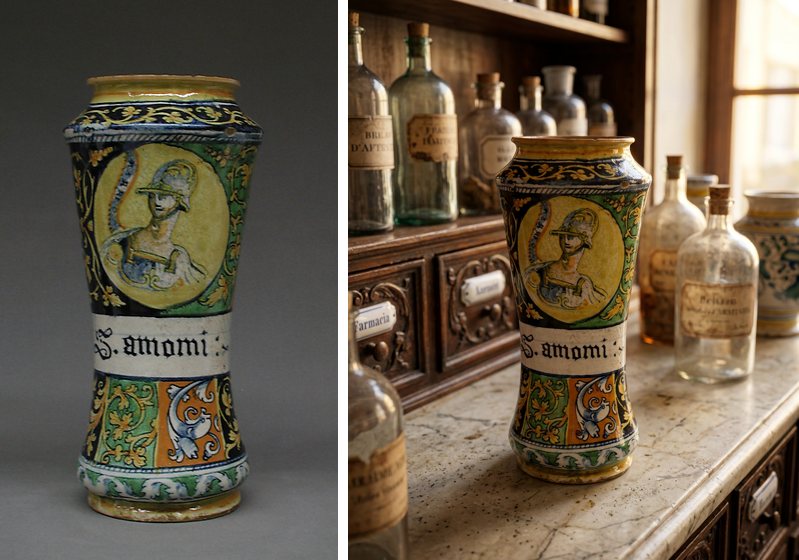
Found and accepted at the first attempt: faithful, 0.847. 5 credits — Lifestyle 5; Locate Subject, the judge
and the correction a few milli-credits each. The worst case of three attempts, 17 credits, was reserved with the hold’s margin, and what was
not spent went back when the run ended. The
report is the step’s report output.
A strong generator keeps a product faithful more often than not, as here; the step then costs one attempt, and the
picture is checked before it is used, which is the point. When it is not faithful, the correction names what
changed — “Match the central medallion’s figure and its painted details more closely to Picture 2, including the
helmet, face, arm…”, as one of the earlier runs wrote — and the next attempt receives it on Lifestyle’s
instructions.
Adapt it
Section titled “Adapt it”- Your product. Any product photo; the judge’s question names what matters for it — the print of a garment, the label of a bottle, the dial of a watch. Keep the sentence Ignore … the apparent proportions due to the camera angle whenever the scene changes the viewpoint.
- A face or a person. The same pattern applies to a person who must stay recognisable across scenes: ask about the face, the hair, the clothes, never about the pose the scene asks for.
- Many products. Put the step inside an iteration: every product gets its own attempts and its own report, as in I10.
- A measured rule too. Add Color Palette or Image Statistics to the body and accept when the model and the measurement both say yes (Combine Conditions).
Install it
Section titled “Install it”node madoo-install-example.mjs i11-faithful-scene --api <your Madoo API URL> --key <key.json> --run --save sceneThe installer uploads the museum photo, installs and publishes the body, then the workflow that calls it. A run makes one to three pictures: about 5 credits, 17 at most — check with the estimate first.
The jar is object 188537 of The Metropolitan Museum of Art (Open Access, public domain); the picture was made by Lifestyle’s default model, for this example.
manifest · workflow · body · report · the body as a graph